Changelog
Releases and what changed, newest first.
- ImprovedLatest
The quote cap now applies to each post, not the whole campaign#
The number next to Quote, as in "Quote (max 2)", now means how many of your quotes of that one post count. Quote a different post and it counts on its own. Before, it was the total for the whole campaign, so a campaign with dozens of posts only ever counted your first two quotes. Once you reach the cap on a post, its Quote button stays at "Quoted 2/2".
- Campaigns that already settled are not affected.
- Campaigns still running switch over from their next update.
- New
Fixed-rate campaigns tell you when all rewards are claimed#
A fixed-rate boost campaign has a fixed total, paid first come, first served. When it runs out, the campaign card, the campaign details and your posts now show All rewards claimed, and the boost entry closes — so you don’t spend time on boosts that can no longer earn.
- You can still open the campaign and see the actions you recorded.
- New
USDC payouts arrive as a claim link#
You no longer create an AllScale invoice for a USDC payout. Request the payout as usual; once it’s approved and funded, a claim link appears on that payout on your Earnings page. Claim it within 14 days to an AllScale wallet, your own Arbitrum wallet, or a new wallet created with your email.
- Payouts under $100 are sent without waiting for a person; larger ones are approved by our team first.
- The claim link is shown only on your Earnings page and is never sent by email. A claim link that reaches you any other way isn’t from us.
- Payouts over $1,000 still use an AllScale invoice.
- Improved
Undone reposts are marked and not paid#
A repost now has to still be up when the campaign locks for settlement to be paid. If you undo one, your card marks it Undone instead of still showing it as detected. Repost again and keep it up until the campaign ends, and it’s paid as usual.
- Campaigns that already settled are not affected.
- Improved
Spare draft slots show a button on the campaign card#
When a campaign gives you more than one draft slot and your submitted posts are all under review or live, the Create track now carries a Submit draft button next to View posts. Before, the only sign of a spare slot was the 1/2 count in the header and the button inside the posts dialog.
- The button appears only when nothing else on the track needs your hand — a draft to finish, changes to make, or a link to paste always comes first.
- Improved
Campaigns no longer carry a language bonus#
Campaigns pay for the reach a post actually delivers, and that is now the whole story — there is no separate bonus for writing in a particular language. Campaigns that already ran with the bonus settle exactly as shown; nothing already earned changes. The English-bonus medal stays on the posts and settlement records where you earned it, and simply does not appear on new campaigns.
- Your existing medals and settled amounts are untouched.
- Campaign cards and the apply sheet no longer show a language bonus line.
- Improved
Create is open from your first campaign#
A new member’s first campaign used to be Boost-only: Create unlocked after a campaign you took part in closed and settled. That wait existed before Creator and Booster tiers did. Your tier is now decided when your account is reviewed, and each campaign decides its own Create roster on top of that — so the extra wait is gone. If a campaign shows Create, you can submit a draft on it right away; Boost stays open the same as before.
- Create opens as soon as a campaign’s Create track is open to you — no settled campaign required first.
- Invite-only campaigns are unchanged: when a campaign’s Create track is limited to invited creators, you can still earn on it by boosting.
- Improved
Typical reward now shows what creators were actually paid#
The apply sheet used to show a rate per 10k effective exposures under Typical reward, which read like an amount per person. It now shows the middle half of what creators were actually paid on settled campaigns, with creation and boost earnings shown separately and a line naming how many campaigns and creators the figures come from.
- It’s our track record, not a promise for any one campaign.
- When there aren’t enough settled campaigns to go on, the figure isn’t shown.
- Improved
Invite rewards now follow market demand#
Invite rewards used to be one schedule for everyone. Brand demand isn’t even across markets, so there are now two published schedules: the standard one ($10/$15/$25 by reach, +$10 English bump, Booster $5) where campaign demand concentrates, and an adjusted one ($5/$7/$12, Booster $2, no English bump) in markets with less brand demand. Which markets sit where moves with what brands are buying; changes land on the invite guide and this page first, and every invite keeps the schedule it was created under.
- Both tables are published in the invite guide — the reward shown on each invite is the one that applied.
- Schedule changes apply only to invites accepted after their effective date.
- New
Reposts now count as a boost#
Boosting used to mean two things: a quote or a reply. Reposts now count as a third action. The reason we left them out before no longer holds — X publishes the list of accounts that reposted a post, so a repost can be credited to the person who made it, unlike a like or a bookmark. A repost carries no writing of yours and no reach of its own, so it counts for less than a quote or a reply, but it counts. Your boosts now show up split by action instead of as one lump number, ordered by what each one delivers: quotes, then replies, then reposts. The reward stays a single figure.
- Reposts of campaign posts are picked up automatically — nothing to submit.
- The breakdown appears once a campaign settles. Campaigns that ran before this shipped show no repost count, because reposters were never collected for them.
- New
Sign in with Google or email#
Besides 𝕏, you can now sign in with Google or with your email. Whichever you use, you connect your 𝕏 account once before joining campaigns — rewards settle to the account you post from.
- Improved
The language bonus now looks at who reads you#
The language bonus used to depend on one thing: the language you wrote in. From now on it takes two — the campaign’s bonus language has to be more than 50% of your audience, and the post itself has to be written in that language. Tutti estimates your audience mix from your followers; you can see it under My audience on your profile. The reason is simple: the bonus pays for reach into that language, and a post in a language your followers don’t read doesn’t deliver it. This applies to campaigns starting after 8 August 2026 — campaigns already running keep the old rule until they settle.
- Both conditions are required — writing in the bonus language is no longer enough on its own.
- Your audience mix lives under My audience on your profile, and is an estimate from a sample of your followers.
- The bonus amount and its per-post cap are unchanged, and every campaign offering it currently uses English.
- Improved
Invites get their own page — and a clearer rule#
Invites now live at /invite instead of a tab inside your profile, with a status for every friend you invited and a full guide at /docs/invite. Two things changed in what you see: an invite that hasn’t qualified no longer shows an amount, so every number on the page is money that is already yours; and where a reward used to say it was waiting to unlock, it now names what it is waiting on. For invites created from 1 August 2026, an invite counts once your friend publishes one approved piece of work — how it performs makes no difference, but boosting alone no longer counts. Invites created before then pay out under the old rules.
- Unlocking depends on your invitee publishing, not on time passing — there is no countdown.
- Reward amounts are unchanged: $10 / $15 / $25 by your friend’s reach, plus $10 per tier for English-speaking audiences.
- Paused accounts can now update their payout method from Earnings, so a withdrawal is never stuck waiting on a QR code.
- Improved
Two new factors on the effective-exposure list#
The factor list at /docs/effective-exposure now documents Factor 3 (anomalous-traffic exclusion) and Factor 4 (external engagement first), both in effect since Jul 27, 2026. View growth judged non-organic no longer counts toward effective exposure or campaign progress, and engagement scoring now prioritizes interactions from real audiences outside the platform. The docs page explains both in full.
- Improved
Estimates are now a range#
While a campaign is running, your reward now shows as an estimated range instead of a single number — open a campaign from My Campaigns to see the range and which badges apply. The range updates with the daily snapshot, and your final reward is confirmed exactly at settlement. Earnings changed with it: Total Rewards now counts only money that is already yours, and running-campaign estimates sit in Pending as a range until they settle. A single mid-campaign number implied a precision that does not exist — it shares a pool with every other creator and shifts with each snapshot, which made every dip look like a deduction.
- Campaign cards stay free of mid-campaign dollar figures; the range lives with your posts.
- The range is deliberately coarse — it moves with your data, never pretends to be exact.
- Settled campaigns still show exact amounts everywhere, including bonus medals.
- Fixed
Campaign progress no longer counts suspended accounts#
When an account is suspended for inauthentic activity, its posts now stop counting toward every campaign’s progress bar — not just the campaign where the issue was found. Settlement already worked this way; the progress display and the automatic draft cutoff now follow the same rule. A campaign that crossed 100% on excluded data reopens for drafts until real contributions reach the target.
- New
Import your draft from Notion, Feishu, Google Docs, or YouMind#
Draft where you already write, then bring it into Tutti in one step. In the draft editor, choose Import document and paste a public document link — headings, lists, tables, code blocks, quotes, images, and video come across. You preview the result before it replaces your current draft. Text is ready immediately; images and video are copied into Tutti in the background while you keep editing, so they keep working even after the source link expires.
- Supported links: public Notion pages, Feishu docs, Google Docs, and YouMind documents.
- Unsupported blocks are simplified rather than dropped, and anything that can’t be copied is flagged — nothing goes missing silently.
- Improved
Draft video uploads: about 4× faster, steadier on weak networks#
The draft editor now uploads video in parallel chunks and recovers from brief network drops instead of failing. In our tests a 200 MB file went from about 50 s to about 13 s; the slower your connection, the bigger the gain. iPhone footage (HEVC / .mov) uses the same fast, resilient path now — format conversion still runs on our side after the upload finishes.
- My campaigns: each post now shows as a journey card — Draft · Review · Publish · Reward — with a single clear next step.
- Reward distribution on campaign cards is now split into creator and booster tracks, with bar heights on a log scale so the long tail stays visible.
- Campaign progress bars now run on effective exposure — the same number rewards use — and no longer count forfeited posts.
- Reposts and quotes are now counted together under the repost icon on post stats.
- New
Docs: a getting-started guide for new creators#
One page that walks a new creator through the whole flow — the four steps to a first reward, ground rules, how to pick campaigns, a pre-post checklist, what affects rewards, and how payouts arrive. About a 10-minute read.
- Find it at Docs → Getting started. It is also linked from the welcome page while your account review runs, and from empty campaign lists.
- New
My rates: set your own asking price#
You can now tell Tutti your asking price per channel — one rate for an original X post, one for a dedicated YouTube video. Rates help match you with campaigns whose budget fits yours; leaving them blank keeps automatic matching.
- Find it under Profile → Basic info → My rates. Change it anytime, or switch back to automatic matching with one tap.
- A higher rate means fewer matching campaigns but more per collaboration — the trade-off is yours to set. Rates are a matching signal, not a binding commitment.
- Improved
Docs: a dedicated “How rewards work” page#
Everything about reward math now lives in one place — the pool model, what moves your estimate, badges that change the weight, and when the number locks. Every docs section also got its own copyable link.
- New page at /docs/rewards; reward tooltips across the app now deep-link into it.
- FAQ, rules, badges, invoice guide and changelog sections are all individually linkable — hover a heading to copy its anchor.
- Improved
Referral rewards now scale with reach#
The referral reward moved from a single flat amount to tiered payouts based on your invitee’s follower count, and it is now earned only when they genuinely take part — not just sign up. Inviting also unlocks after you complete at least one campaign of your own.
- Tiered by your invitee’s followers when they participate: under 3,000 — $10; 3,000–10,000 — $15; 10,000 or more — $25. Creators whose primary language is English earn $10 more on every tier.
- A reward is earned only when your invitee passes account review and takes part in at least one campaign — an original post or a boost both count.
- The invite page tracks each invitee’s stage — Registered → Approved → Participated. Up to 20 qualifying invites per month; each reward confirms after 7 days before it can be withdrawn.
- New
Your creator stats, in one shareable page#
A new Stats page brings your reach and content quality together in one place: total views, approved posts, draft approval and Boost pass rates — each showing where you rank among creators — plus your activity over the past year and the badges you have collected. It is private by default; publish a shareable link whenever you want.
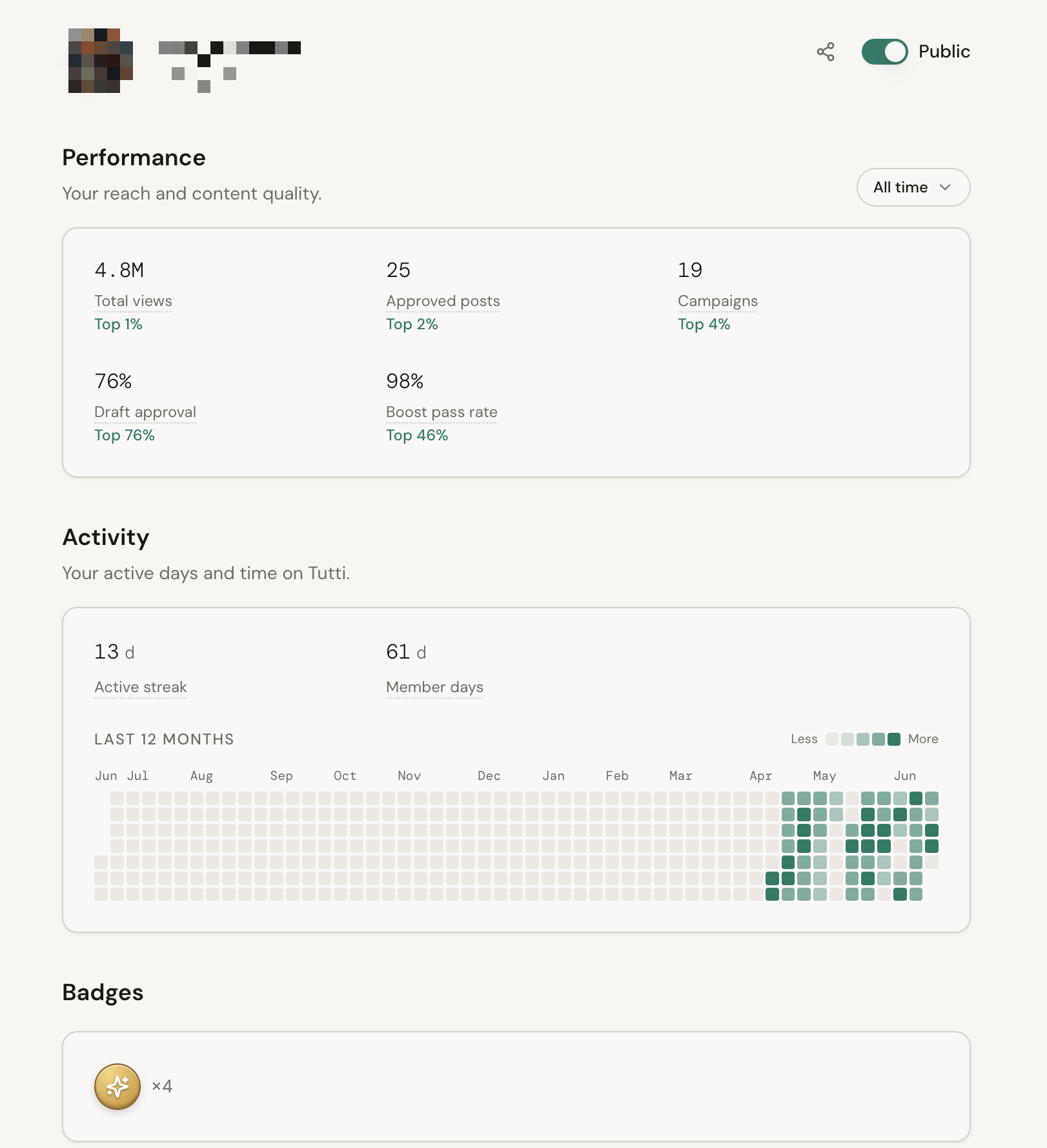
- Pick a time range — 30, 90, 180 or 365 days, or all time — and every Performance number, including your ranking, recomputes over that window. Activity and badges stay all-time.
- No earnings or dollar figures — those stay on the Earnings page. Stats is about reach and quality only.
- Private by default. One toggle publishes a public link to your stats that you can share on 𝕏.
- New
Write drafts in-app, with brand feedback inline#
Draft your post directly in Tutti instead of pasting a link. Write in a rich editor — headings, lists, images — submit it for review, and the brand leaves feedback by highlighting your text, right where it applies. Approve, publish on 𝕏, and paste the link to start tracking.
- A full draft workspace per post: rich text, pasted and uploaded images, and the brand's comment thread side by side.
- Edits to a draft under review are confirm-gated — you choose when to pull it back to draft and resubmit, so the brand never reviews a moving target.
- Once published, a draft becomes read-only — you can still open it to review, but it can no longer be changed.
- New
Past campaign history#
Open any past campaign from My Campaigns to see its full history: every draft you submitted, the views and engagement each post earned, and the brand's feedback — including the reason behind any rejected draft.
- A per-campaign summary: submissions, published, selected, pass rate, engagement, views, and earnings.
- The brand feedback thread stays available after a campaign ends, so rejection reasons are no longer lost.
- Improved
Clearer campaign participation#
Campaigns now lead with what you can do. When a campaign's Create track is reserved for selected creators, you'll see "Open to boost" instead of a locked row — boosting is always a way in.
- New
Reward distribution & your standing#
Every campaign you join now shows where your reward sits among all participants — added for transparency, so you can see how many creators took part and how rewards are spread.
- A compact "Top X% · N creators" line on each campaign card.
- A pop-up histogram of the full reward distribution, with your position highlighted.
- Live campaigns read the latest daily snapshot; settled campaigns use final settlement numbers.
- Improved
Scheduled publish window#
Approved drafts now show a countdown to the brand’s publish time. The post-link box unlocks once the window opens, so everyone posts together.
- New
Referral program#
Invite other creators with a personal link. Approved invitees earn you a referral reward after a short holding period.
- New accounts pass a quick automated review before they can join.
- Improved
Refreshed campaign view#
The campaign details view was redesigned with a warm-neutral palette, clearer stat tiles and a floating call-to-action.
- New
Campaign modifiers#
Cards now surface the buffs and soft-caps that affect your rewards — handpicked, English bonus, diminishing returns and more — as small chips with plain-language tips.
- New
Creator and Booster tracks#
Each campaign card splits into a Creator track (original posts) and a Booster track (reposts and quotes), each with its own rewards and engagement metrics.